
Fake Social Security Statement Scam Targets Your Computer
An email claiming your latest Social Security statement is ready might sound legitimate, but clicking the link could put you at risk.
This week, I received a phishing email posing as a Social Security Administration (SSA) notification. It directs recipients to a website that impersonates the agency and attempts to download remote-access software onto their computers.
The software itself is legitimate. The problem is who’s trying to get you to install it—and what they might do with access to your computer.
Here’s how the scam works, what to watch for, and what to do if you’ve already clicked.
How The Fake Social Security Email Works
The email, which I received on October 20, 2026, has the subject line “[Confirmation] Your statement is here” and features a Social Security logo.
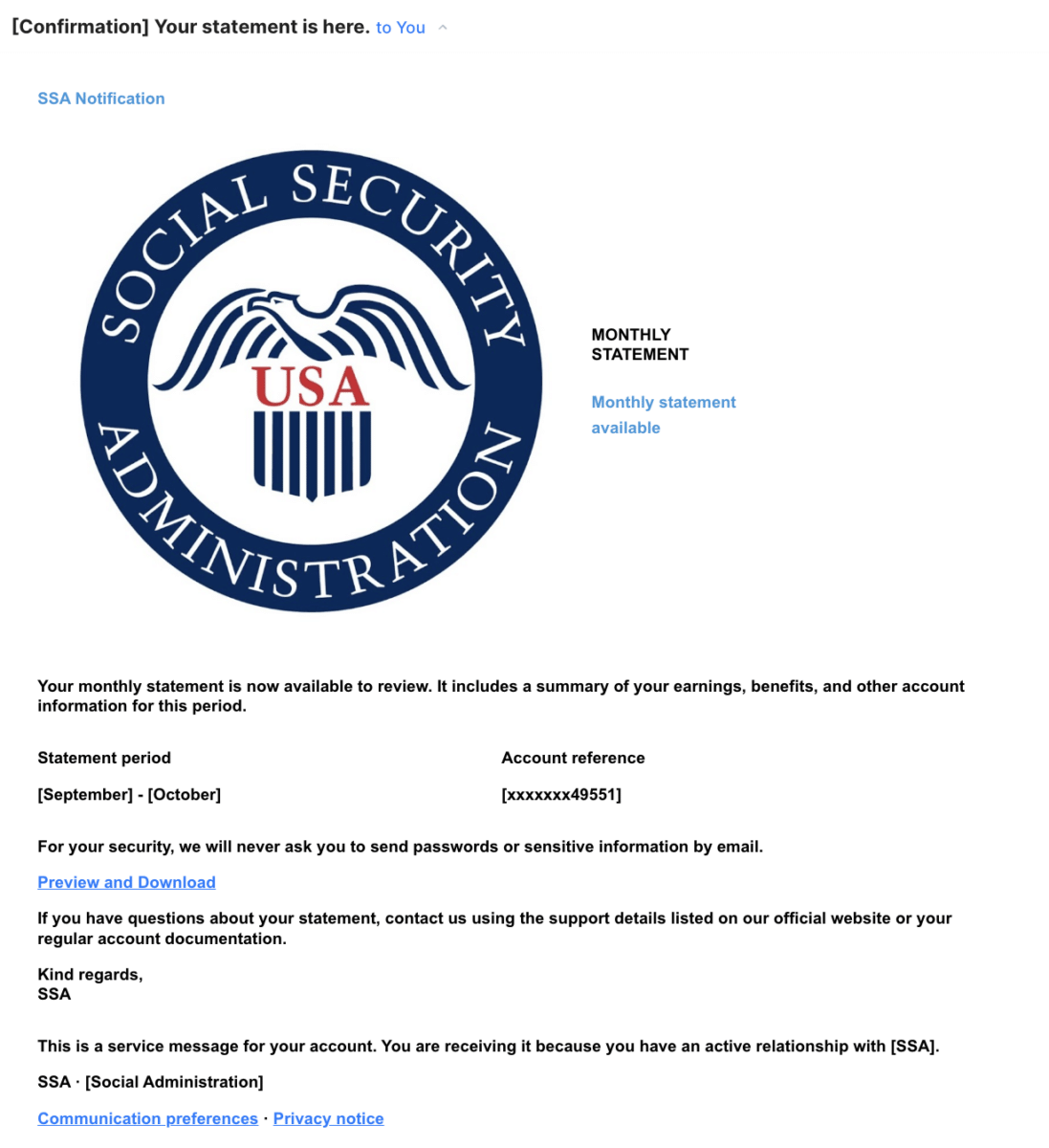
The body of the email announces that a monthly statement is available for review and claims the statement includes earnings, benefits, and other account information for September through October.
You’re encouraged to click a link labeled “Preview and Download.”
But that link doesn’t lead to Social Security’s website. Instead, it directs users to a page on an unrelated organization’s website that looks like a guide to access Social Security statements—only it isn’t.
The page also attempts to download a program called ScreenConnect.
Why ScreenConnect Matters
ScreenConnect, made by ConnectWise, is a legitimate remote-access tool IT professionals and businesses use to provide technical support and manage computers. There’s nothing wrong with the software—you might have even used it at work. But in the wrong hands, remote-access programs can give scammers a way to control someone else’s computer.
Here, the website appears designed to initiate a ScreenConnect installer download about five seconds after the page loads. The page also instructs you to install what it describes as a document viewer. Despite the references to a Social Security statement and a PDF, the program being offered is an executable file (meaning it’s a program, not a static file like a document).
If you run the installer and the software successfully connects to a scammer-controlled account, the scammer may be able to access your files, view your sensitive information, or interact with your computer without your permission. Depending on the configuration, that access may continue after the initial installation.
The Website Raises Additional Questions
The specific link—which purports to be affiliated with the SSA—actually leads to myabtc.org/ssa, a page on the website associated with the American Baptist Theological Center (ABTC), a religious educational organization in California.
It’s not yet clear how the fraudulent page appeared on the website or whether someone gained unauthorized access to the organization’s systems. In response to questions from Taxgirl, ABTC acknowledged receiving the report and said it was investigating.
“We are treating your report as a potential security incident and are working to have the page and its associated activity investigated,” ABTC Administration said in an email.
The organization said it was reviewing the nature and scope of the activity and would provide additional information once it verified its findings.
As of October 21, the suspicious page appears to have been taken down. A scan of the URL conducted that afternoon showed that the page was no longer available, and a subsequent attempt to access it returned a “404 Not Found” error.
ABTC has not confirmed whether it removed the page or determined how it appeared on the website.
The phishing email was also sent through infrastructure associated with WebinarJam, a legitimate webinar and online event platform. Neither ABTC nor WebinarJam is accused of knowingly participating in the scam.
I also contacted WebinarJam and ConnectWise for comment but had not received a response by publication.
This isn’t the first time scammers have used Social Security Statements as bait. In February 2026, the SSA’s Office of Inspector General warned of a sharp increase in fraudulent emails claiming to provide access to Social Security Statements. The agency cautioned that links in those messages could lead to malware, identity theft, or financial loss.
Warning Signs Of A Fake Social Security Email
Email and phishing scams are getting better at tricking ordinary users. This particular message includes several flags that something isn’t right.
- An unexpected monthly statement. Social Security Statements provide an overview of your earnings history and estimated benefits, not a monthly account summary. You can access your Statement through your personal my Social Security account. SSA generally mails paper statements to workers age 60 and older who don’t have an online account.
- A link that doesn’t lead to SSA.gov. The official Social Security website is https://www.ssa.gov. The link in this email instead directs recipients to an unrelated organization’s domain.
- An unfamiliar sender. Although the email displays “SSA” as the sender, the underlying email address uses a domain unrelated to the federal government.
- A request to download software. You shouldn’t need to install a remote-access application to view your Social Security information. You can easily view it through your online account.
- A file that isn’t what it claims to be. A PDF statement and an executable application are two very different things. A file ending in .exe is a program, not a PDF.
One especially important point: scammers can make an email look legitimate by using official logos, professional formatting, and reassuring security language. None of those things establishes that a message actually came from the government.
What To Do If You Receive One Of These Emails
If you receive an unexpected Social Security benefits email or statement, don’t click the link in the email. You can report it by contacting the Social Security Administration’s Office of the Inspector General at oig.ssa.gov.
And don’t assume a website is trustworthy just because it has a familiar name, a government seal, or an HTTPS address. Secure connections protect information traveling between your browser and a website, but they don’t establish that the website itself is legitimate.
If you have legitimate questions about your Social Security benefits, you can visit ssa.gov directly by typing the address into your browser. You can sign in to your personal my Social Security account to review your statements and benefit information.
What If You’ve Already Downloaded The Software?
Downloading a file is not the same as installing it. If the installer downloaded but you didn’t open or run it, don’t execute it. Delete the file and run a security scan if you’re concerned.
If you ran the installer, take the situation more seriously. Disconnect the affected computer from the internet to interrupt any active remote connection. Contact a trusted IT professional or security specialist to check for unauthorized remote-access software and help remove it. Simply uninstalling a program may not be enough to establish that a compromised computer is safe to use.
From a different, trusted device, change important passwords, beginning with your email and financial accounts. Review those accounts for suspicious activity, and contact your financial institutions if you believe any account information was exposed.
The Bottom Line
Scammers don’t always need you to hand over your Social Security number, bank account information, or passwords. Sometimes, they want you to open the door yourself. That’s what makes this particular scam worth paying attention to. A message promising a routine government document may instead lead to software that gives someone else access to your computer.
Your best bet? Don’t click links in emails that claim to be from federal agencies like the IRS or the Social Security Administration. Always go to the official website if you have questions about your account.
Remember, when in doubt, assume it’s a scam.




Want more Taxgirl?
Get tax news, explainers, deadlines, and more delivered straight to your inbox.
Subscribe →